How to Play Project Afternight
Notes, judgements, audio, and the habits that turn a first pass into a shop unlock.
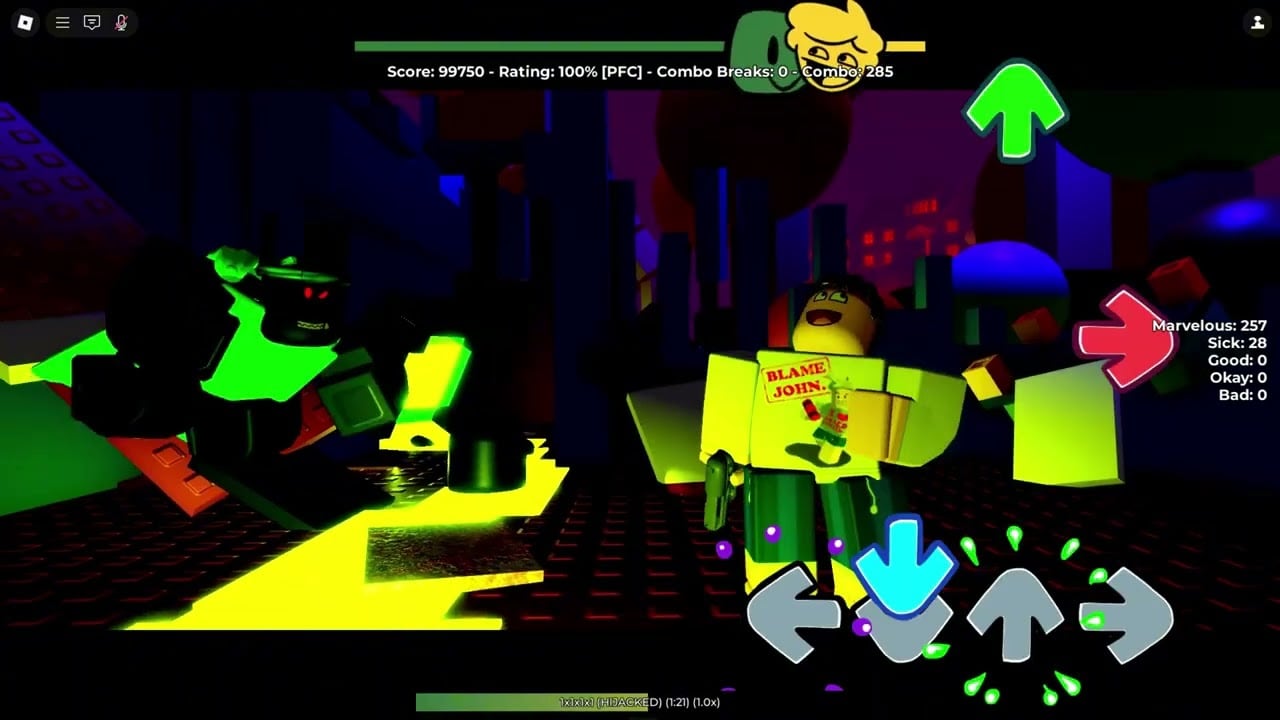
Friday Night Funkin on Roblox is still four arrows and a song. Project: Afternight just gives you thousands of charts, a shop that cares about accuracy, and enough settings to hide the notes if you fidget. This page is the play loop after Getting Started. Bind questions go to controls.
The chart
Notes travel toward a strumline. Press the matching bind when the note overlaps the receptor. Hold notes need a hold. Special notes (mines, hurt notes, event notes) follow the tab’s rules — leave special notes enabled if you want shop credit. Turning them off to “make the chart fair” is how unlocks refuse to toast. See how rewards work.
Judgements typically read as Marvelous / Sick / Good / Bad / Miss depending on your timing window. Combo increases on hits and breaks on misses. Accuracy is a running percent; 70% at 1x is the shop floor for most rows. PFC (perfect full combo) and MFC language shows on the HUD when you are clean. That HUD is also how you know a script is lying — some autoplay loops never write score. Autoplay scripts document that caveat.
Audio is not optional
Mute-play is how people sit at 62% and blame the engine. Hitsounds at a low volume plus the song itself will carry more timing information than the arrows alone, especially on modcharts. If the mix is painful, lower music slightly before you kill hitsounds. Accessibility toggles for flashes live in settings.
Headphones help. Laptop speakers plus island ambience is a great way to miss a 1/4 jump.
Difficulty is a ladder, not a vibe
Easy exists so your first session is a song, not a lecture. Normal is where most cosmetics still drop. Hard is the default for people who already play FNF on PC. Insane and mania keys (8K–18K) are a different sport — song tiers and keybinds before you queue them in versus.
Rate above 1x is a flex and still counts for shop. Rate below 1x usually does not. Do not slow a chart to 0.5x and expect an animation.
Shop colors while you play
In the locker/shop:
- Blue = equipped on you.
- Orange = equipped on the bot/opponent.
You can preview event animations by switching preview side. Some event anims only play from one side — a shop-page comment from a developer called this out on Madness Hits coverage. Shop unlocks is the full UI pass, including search and note recoloring from Classic Resurrections.
Emotes play while you sit on a speaker, not during the chart. Equip them before you idle so the island looks like you belong there.
A clean play session
- Solo or bot — not a random 4v4. Versus can wait.
- Pick a tab you like from mods or the mods tier list.
- Play Easy/Normal until you can hold 70% without staring at your fingers.
- Read the shop requirement for one item, then play that exact chart.
- If you fail, change note speed, not the song’s identity. Chasing a new tab every miss is how you own nothing.
Modifiers (Fade In, Inverse Notes, randomize chart) are for badges and masochism. They are documented on modifiers. Do not stack them on your first Full Combo attempt; that is what accuracy and FC is for later.
Mobile and console
Touch works. It is worse. Use a smaller note speed, larger receptors if the slider exists, and do not start on 9-key. Console players should confirm binds in settings before versus. Desktop remains the intended setup, which is why this wiki’s screenshots look like a keyboard HUD.
When the chart is unfair
Some mods are accurate recreations of PC FNF files that were never meant to be hit on a Roblox server with 40 player spawns in the background. Drop extras, close the island visually, and remember the game is beta. If a patch just landed, skim updates — Eye of Corruption and Classic Resurrections both moved UI chrome that people misread as input lag.
Play the song. That is still the whole game.
Frequently Asked Questions
Quick answers to the most common questions.
What percent do I need for cosmetics?
Usually 70% at 1x with modcharts on. Full rule set: how rewards work.
Should I play with a hitsound?
Yes, quietly. Timing lands faster than mute play. Options: settings.
What do blue and orange mean in the shop?
Blue is you, orange is the bot. More UI notes in shop unlocks.
Is there a tutorial song?
The original FNF Tutorial plus Week 1 Easy. Start from Getting Started if you have not sat on a speaker yet.